Mechanical Keyboards for Remote Work: Are They Worth It?
Decide whether a mechanical keyboard is worth it for remote work by comparing switch feel, sound, layout, height, wireless reliability, repairability and total cost.
What to know first
- Buy for your workflow and connection needs, not headline specifications.
- Reliability and warranty often matter more than a minor speed gain.
- Check compatibility before committing to an accessory.
A mechanical keyboard is worth it for remote work when you value a particular key feel, layout, repairable switches or long service life. It is not a guaranteed productivity or ergonomic upgrade. Poor switch choice, excessive height, unreliable wireless or loud sound can make it worse than a basic office keyboard.
Start with layout and noise limits, then choose switch feel. Do not buy by color or switch name alone.
Quick verdict
| Question | Practical answer |
|---|---|
| Will it make you type faster? | Not automatically |
| Is it more ergonomic? | Only if layout, height and position fit |
| Is it always loud? | No, but many builds are louder than office membrane boards |
| Does switch color guarantee feel? | No; brands vary |
| Is hot-swap useful? | Yes for repair and experimentation |
| Is wireless necessary? | No; wired is simpler |
| Is a palm rest required? | No; front height and typing position decide |
| Is expensive always better? | No; priorities and quality control matter |
The best office keyboard supports the work without becoming the work.
How a mechanical keyboard differs
Each key uses an individual switch mechanism, usually with a stem, spring and electrical contact. Conventional office keyboards often use rubber domes or scissor mechanisms.
Mechanical designs can offer:
- Distinct tactile choices
- Replaceable switches on hot-swap boards
- Durable keycaps
- Programmable layers
- Broad layout selection
- Repair potential
They can also add height, weight, noise and software complexity.
Switch categories
Linear
Moves without a designed tactile bump.
Feels: smooth and consistent.
Office considerations: can be quiet with suitable construction, but light versions may cause accidental presses.
Tactile
Provides a bump during the keypress.
Feels: feedback without an intentional click mechanism.
Office considerations: a common compromise; bottoming out can still be loud.
Clicky
Adds an audible click with tactile feedback.
Feels: distinct and lively.
Office considerations: often disruptive in shared homes, calls and recordings.
Switch category does not predict total keyboard sound. Case, plate, keycaps, desk, typing force and microphone all contribute.
Sound in a remote office
Working alone does not mean sound is irrelevant. Consider:
- Household members
- Neighbors through thin walls
- Video-call microphone
- Voice recording
- Evening schedules
- Your own fatigue
Record a typing sample through the actual meeting microphone. Noise suppression may distort speech while trying to remove sharp keystrokes.
A desk mat can reduce resonance, but it does not make clicky switches silent.
What makes a keyboard quieter
- Quiet or silent switches
- Controlled typing force
- Stable keys
- Lubricated stabilizers from a reputable assembly
- Dense case construction
- Dampening designed without trapping heat in other equipment
- A solid desk surface
- Microphone positioned close to the mouth and away from keys
O-rings mainly change bottom-out feel and sound. They do not silence the return stroke or internal case resonance.
Layout choices
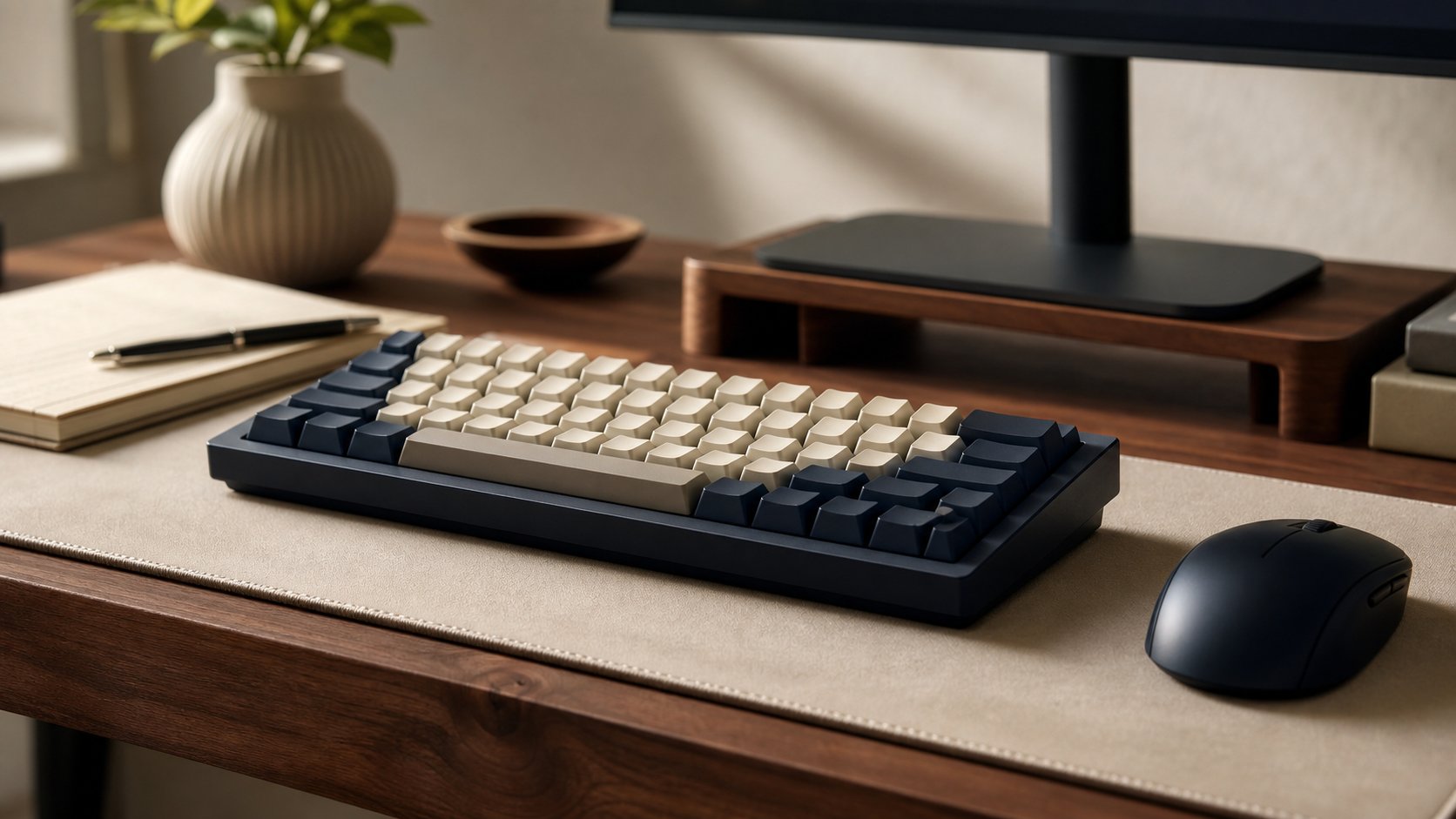
Full size
Includes number pad, navigation and function row.
Best for: frequent numeric entry and familiar key positions.
Trade-off: pushes the mouse farther outward.
96 percent or 1800-style
Retains most keys in a compressed arrangement.
Best for: number-pad users with limited width.
Trade-off: tighter spacing can cause mistakes initially.
Tenkeyless
Removes the number pad but keeps navigation cluster and function row.
Best for: general office work and closer mouse placement.
75 percent
Compact while retaining function row and arrows.
Best for: smaller desks with moderate layer use.
60 or 65 percent
Removes function row and more navigation keys.
Best for: users comfortable with layers.
Trade-off: shortcuts, spreadsheets and development tools may require combinations.
Choose the smallest layout that keeps frequently used keys easy—not the smallest one available.
Ergonomics: height matters
Mechanical keyboards are often taller at the front edge than laptop or scissor keyboards. This can bend the wrists upward when the desk is already high.
Improve fit by:
- Lowering the keyboard surface
- Keeping keyboard feet flat initially
- Choosing a low-profile design
- Using a thin keyboard
- Supporting forearms from chair and desk position
- Using a palm support during pauses when helpful
Do not plant the wrists on a hard edge while typing. Use the keyboard-tray guide if a fixed desk cannot reach a useful key height.
Low-profile mechanical keyboards
Low-profile switches and keycaps reduce total height and travel.
Advantages: easier transition from laptop keyboards and less need for a palm support.
Trade-offs: smaller switch and keycap ecosystem, different feel and limited interchangeability.
“Low profile” is not one universal standard. Verify replacement compatibility.
Wired, Bluetooth or receiver
Wired
Most reliable, no charging and suitable for fixed desks. A detachable cable improves transport and replacement.
Bluetooth
Convenient for several devices but can add wake delay, pairing issues and corporate restrictions.
Proprietary wireless receiver
Can provide lower latency and stable connection, but the small receiver is easy to lose and may require a USB port.
For managed work devices, confirm that wireless peripherals and configuration software are allowed.
Multi-device switching
Useful for a work computer and personal device, but switching can create mistakes.
Check:
- Clear device indicator
- Shortcut behavior
- Operating-system key mapping
- Wake reliability
- Whether clipboard or software crosses devices
- How quickly it reconnects
Never type confidential information until the indicator confirms the intended computer.
Keycaps and legends
Keycap material and profile affect sound, feel and durability.
ABS
Often smooth and bright, with legends that can vary from durable double-shot to printed.
PBT
Often more textured and resistant to shine, though quality varies.
Look for readable legends in your lighting. Side-printed or blank caps may look clean but slow occasional symbol use.
Confirm local language and operating-system legends.
Hot-swap boards
A hot-swap socket lets compatible switches be replaced without soldering.
Benefits:
- Repair one failed switch
- Test different weights
- Change noisy keys
- Extend useful life
Limitations:
- Socket compatibility varies
- Repeated careless removal can damage sockets
- Some switches need pin correction
- Opening the case may affect warranty
Use the included tool, disconnect power and support the socket according to the manual.
Programmability and layers
Remapping can improve a workflow:
- Put navigation near the home row
- Create a media layer
- Move an awkward modifier
- Add application shortcuts
- Support an alternate layout
Avoid storing passwords or confidential text in macros. Company policy may restrict programmable devices or require signed software.
Onboard programming that works without a persistent cloud account can reduce dependency, but evaluate update security.
Switch weight and fatigue
A heavier spring requires more force. A very light switch may lead to accidental presses or bottoming out.
Switch specifications such as initial, actuation and bottom-out force are not always measured consistently across brands.
A small switch tester can reveal general preferences, but one loose switch does not reproduce a complete keyboard’s case, plate and keycaps.
Build quality to inspect
- Stable case
- No sharp edges
- Consistent switch operation
- Large-key stabilizers without binding
- Sound that remains acceptable
- Reliable cable connector
- Clear battery status
- Replaceable cable
- Current firmware process
- Warranty and seller support
Flex is not automatically bad in a designed gasket system; uncontrolled wobble is.
Cleaning and maintenance
- Disconnect the keyboard.
- Turn it over gently to remove loose debris.
- Use approved tools and methods.
- Clean keycaps according to material guidance.
- Keep liquid away from switches and electronics.
- Photograph the layout before removing many keycaps.
- Allow everything to dry fully before reconnection.
Do not spray cleaner directly into the board.
Cost and value
Include:
- Keyboard
- Shipping and tax
- Palm support if needed
- Replacement keycaps for the required layout
- Wireless receiver or cable
- Switches and tools
- Return cost
A repairable $100 board can offer better long-term value than a fashionable $250 model. A reliable $30 scissor keyboard may still be the right choice.
Who should buy one?
Consider a mechanical keyboard when:
- You type for hours and have a known feel preference.
- A compact layout would improve pointer position.
- Replaceable switches matter.
- The sound fits the room.
- You want onboard remapping.
- Long service and parts availability justify the cost.
Who should skip it?
Skip or delay when:
- Current keyboard is comfortable and reliable.
- The workspace is sound-sensitive.
- Desk height already causes wrist extension.
- IT blocks the required connection or software.
- You do not want to maintain another hobby-like device.
- Budget should solve chair, screen or network problems first.
Common mistakes
Buying clicky switches without a sound test. Room and microphone matter.
Choosing a tiny layout for appearance. Missing keys create friction.
Ignoring front height. Wrist position may worsen.
Assuming hot-swap means every switch fits. Check socket and pin compatibility.
Installing unapproved remapping software. Follow security policy.
Buying parts before using the stock board. Test first.
Expecting typing speed gains. Familiarity and skill matter more.
Final recommendation
A tenkeyless or 75-percent board with moderate tactile or quiet linear switches suits many remote workers, but it is not universal. Choose layout first, confirm sound and front height, then decide whether hot-swap and wireless features justify the cost.
Keep a basic keyboard if it already works well. Mechanical keyboards are worth it for controlled feel, repairability and layout—not because switch hardware automatically makes work more productive.