Best Ergonomic Mouse: Vertical vs Trackball Compared
Compare vertical mice, thumb trackballs, finger trackballs and conventional designs by hand fit, movement, precision and software, with five practical options.
What to know first
- Neutral, supported positions matter more than perfect posture.
- Movement throughout the day is part of the setup.
- Persistent pain deserves advice from a qualified clinician.
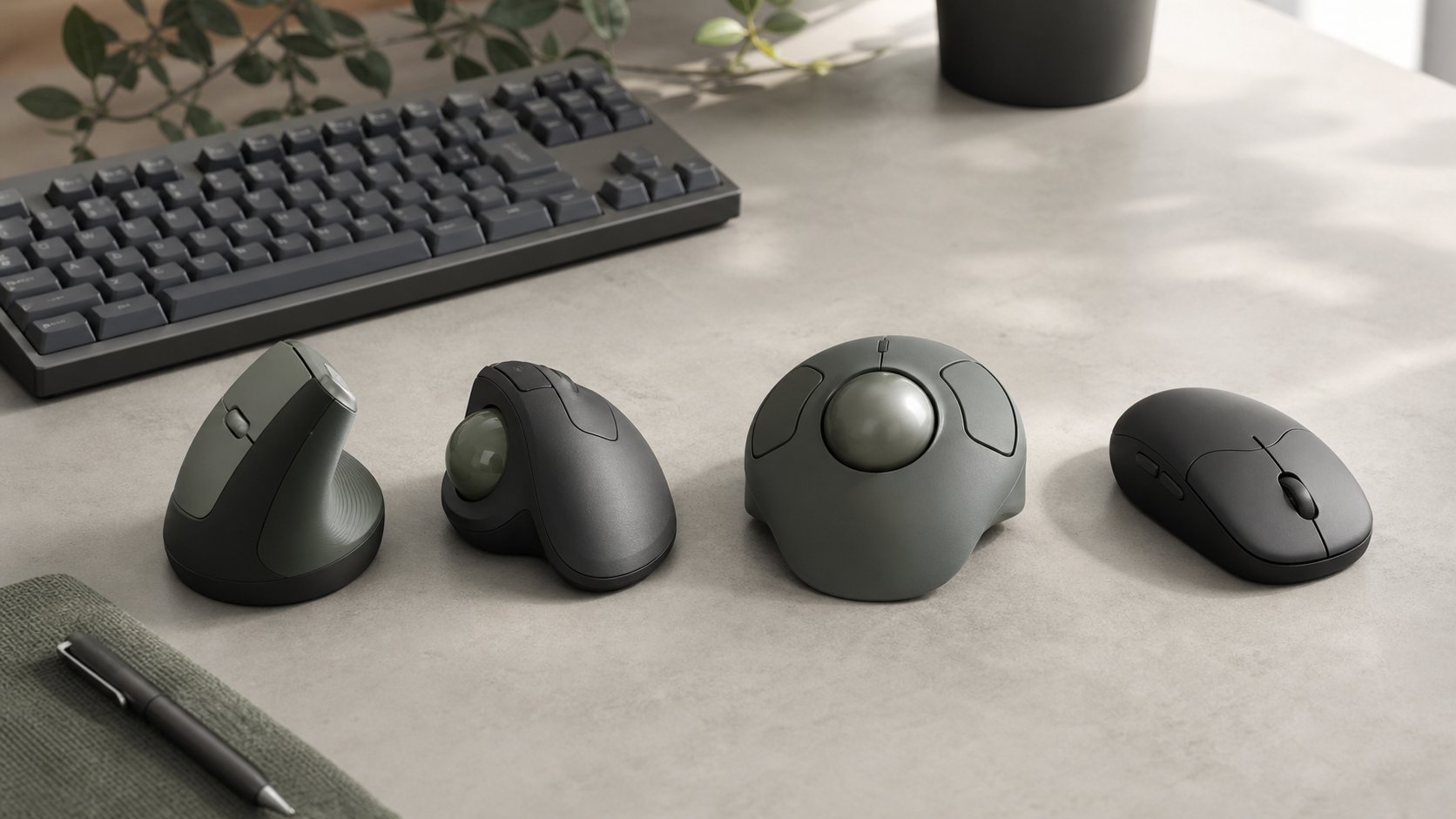
The best ergonomic mouse is the device that fits your hand, keeps the pointer close to the keyboard and supports accurate work without creating new thumb, finger or shoulder demands. A vertical mouse changes forearm rotation. A trackball keeps the device stationary. Neither design is proven to treat an injury or works for everyone.
For smaller to medium right hands, Logitech Lift is an approachable vertical option. Logitech MX Vertical suits larger hands. Kensington SlimBlade Pro offers ambidextrous finger control, while Logitech MX Ergo S and Evoluent VerticalMouse D address different fit preferences.
Quick picks
| Use case | Pick | Design |
|---|---|---|
| Best vertical mouse for smaller hands | Logitech Lift | 57-degree vertical |
| Best larger vertical mouse | Logitech MX Vertical | Tall right-handed vertical |
| Best thumb trackball | Logitech MX Ergo S | Adjustable-angle thumb ball |
| Best ambidextrous finger trackball | Kensington SlimBlade Pro | Large central ball |
| Best size-specific vertical range | Evoluent VerticalMouse D | Small, medium and large versions |
Selections are based on current manufacturer specifications and use cases, not a claim that one product prevents pain.
Vertical mouse vs trackball
Vertical mouse
The hand rests in a more upright position, but the arm still moves the device across the desk.
Potential advantages: less forearm pronation, familiar pointer movement and ordinary scrolling.
Trade-offs: taller body, right- or left-hand specificity, learning period and continued shoulder movement.
Trackball
The device stays still while the thumb or fingers rotate a ball.
Potential advantages: small operating footprint and less arm movement.
Trade-offs: concentrated digit work, ball cleaning and a larger learning curve for precision.
Conventional mouse
A well-sized ordinary mouse can be comfortable when positioned close. “Ergonomic” labels do not automatically beat a simple device.
1. Logitech Lift: best smaller-hand vertical mouse
Lift uses a 57-degree right-handed shape, six buttons, a single AA battery and Bluetooth or Logi Bolt receiver connectivity. A left-handed version is available in selected markets.
Best for: smaller to medium hands transitioning from a conventional mouse.
Strengths: approachable shape, quiet operation, broad OS support and multi-device connection.
Trade-offs: not ideal for large hands, disposable battery and customization that may require optional software.
Check the current Logitech Lift specifications and regional handedness options.
2. Logitech MX Vertical: best larger vertical mouse
MX Vertical is taller and larger than Lift, with a rechargeable battery, 4000-DPI sensor, USB receiver, Bluetooth and wired USB-C charging connection.
Best for: medium to large right hands and users who prefer a substantial support surface.
Strengths: three connection methods, pointer-speed button and rechargeable design.
Trade-offs: large footprint, right-hand-only shape and older Unifying receiver rather than the newer Bolt platform on many regional models.
Review the MX Vertical specifications for current compatibility.
3. Logitech MX Ergo S: best thumb trackball
MX Ergo S uses a thumb-operated ball and an adjustable base that changes the hand angle. The device remains stationary and can switch between computers.
Best for: limited desk width and users who prefer thumb control.
Strengths: no sweeping mouse movement, adjustable tilt and multiple programmable controls.
Trade-offs: concentrated thumb use, right-handed design and regular ball cleaning.
People with thumb symptoms may prefer a finger-operated trackball or conventional pointer.
4. Kensington SlimBlade Pro: best ambidextrous finger trackball
SlimBlade Pro uses a 55 mm central ball controlled by the fingers. It supports Bluetooth, a 2.4 GHz receiver and wired operation and has four main buttons with additional combinations through optional software.
Best for: left- or right-handed use, minimal shoulder movement and larger hands.
Strengths: ambidextrous body, three connection modes and large ball.
Trade-offs: wide footprint, unconventional ball-twist scrolling and software limitations on some operating systems.
Kensington’s SlimBlade Pro page lists current platform support and wireless encryption.
5. Evoluent VerticalMouse D: best size-specific range
VerticalMouse D is offered in small, medium and large right-handed versions, with wired, receiver and Bluetooth variants depending on size and region.
Best for: buyers willing to measure hand length and choose an exact version.
Strengths: size range, pronounced upright shape and dedicated pointer-speed control on relevant models.
Trade-offs: model complexity, higher price and different software support between receiver and Bluetooth variants.
Evoluent’s medium wireless specifications include a hand-length guide and connection limitations. Verify the exact suffix before ordering.
Hand size matters
Measure from the first wrist crease to the tip of the middle finger. Compare that number with the manufacturer’s sizing guidance.
A device that is too large can force the fingers to reach. One that is too small may leave the hand unsupported or curl the fingers tightly.
Width and thumb position also matter, so a length chart is only a starting point.
Mouse position matters more than shape
Keep the pointer:
- Beside the keyboard
- At approximately the same height
- Within a relaxed reach
- On a stable surface
- Away from a sharp desk edge
A full-size keyboard pushes the mouse outward. A tenkeyless board or separate number pad can reduce reach.
OSHA’s pointer guidance recommends keeping the device close and maintaining a broadly neutral wrist position.
Thumb vs finger trackballs
Thumb ball
The fingers click while the thumb moves the cursor.
Good for: users who want a conventional button arrangement.
Watch for: thumb fatigue and overuse.
Finger ball
Index and middle fingers move the ball while thumbs or fingers click.
Good for: ambidextrous use and distributing motion across larger fingers.
Watch for: precision learning and wide devices.
Neither is universally more ergonomic. The better choice is the one that remains comfortable through the actual task.
Wired vs wireless
Wired
No charging, simple security profile and predictable wake behavior.
Receiver
Often reliable but occupies a USB port and the receiver can be lost. Business receivers may offer documented encryption.
Bluetooth
Preserves ports and supports several devices, but pairing, sleep and managed-device policy can create friction.
Confirm employer approval before installing configuration software or using wireless peripherals.
DPI and pointer speed
A higher DPI moves the cursor farther for the same physical input. Excessively low sensitivity can increase arm movement; excessively high sensitivity can reduce precision.
Start with the operating system’s middle range and adjust gradually. Disable pointer acceleration only when the task and preference justify it.
For large or multiple monitors, use a speed that reaches the full display without repeated lifting or exaggerated ball motion.
Buttons and shortcuts
Extra buttons can reduce repeated keyboard-pointer travel for:
- Back and forward
- Copy and paste
- Window switching
- Precision mode
- Horizontal scrolling
Avoid macros containing passwords or confidential text. Configuration applications may collect diagnostics or require elevated permissions.
Basic pointer functions should work even if optional software is unavailable.
Transition plan
A new design can feel inaccurate for several days.
Days 1–2
Use it for browsing and low-pressure tasks for 20–30 minutes.
Days 3–5
Add ordinary document work and tune speed.
Week 2
Evaluate comfort, precision and fatigue across a normal day. Keep the previous mouse available.
Stop if symptoms clearly worsen. Do not force adaptation through pain.
Alternate hands carefully
An ambidextrous device can distribute use, but the non-dominant hand needs a gradual learning period.
Switch primary and secondary buttons in software if helpful. Keep shortcuts and cursor speed consistent.
Do not alternate solely to continue working through a developing injury.
Cleaning
Trackballs collect skin oils and dust around support bearings.
- Disconnect or power off.
- Remove the ball only as instructed.
- Use a dry lint-free cloth on sensors and bearings.
- Avoid scratching optical components.
- Do not spray cleaner inside.
- Let every part dry fully.
For a mouse, clean feet and sensor opening without solvents unless approved.
When an ergonomic mouse is not enough
Pointer discomfort can also come from:
- Desk too high
- Keyboard too wide
- Device too far away
- Excessive click force
- Long uninterrupted work
- Gripping tightly
- High workload
- Uncorrected health condition
Use the wrist discomfort guide for setup changes. Persistent pain, numbness, weakness or tingling deserves qualified medical assessment.
Common mistakes
Buying from a product label alone. Measure hand and task.
Choosing vertical when the problem is shoulder movement. A trackball may reduce travel.
Choosing a thumb ball with thumb symptoms. Consider alternatives.
Putting the new device beside a full-size keyboard. Reach remains.
Changing speed constantly. Adapt gradually.
Assuming discomfort proves useful adaptation. Pain is not a training target.
Relying on proprietary software. Verify basic compatibility.
Final recommendation
Choose Logitech Lift for smaller hands, MX Vertical for a larger upright shape, MX Ergo S for thumb-controlled stationary use, SlimBlade Pro for an ambidextrous finger trackball and VerticalMouse D when size-specific fit matters.
Keep the device close, test it through ordinary tasks and use a return window. No mouse treats a diagnosis. The best ergonomic mouse is the one that reduces repeated strain without transferring the problem to the thumb, fingers or shoulder.