Best Lumbar Support Cushions: 5 Fit-First Options
Compare five lumbar support cushions by profile, firmness, chair fit, straps and lost seat depth, then run a five-day trial before changing the workstation.
What to know first
- Neutral, supported positions matter more than perfect posture.
- Movement throughout the day is part of the setup.
- Persistent pain deserves advice from a qualified clinician.
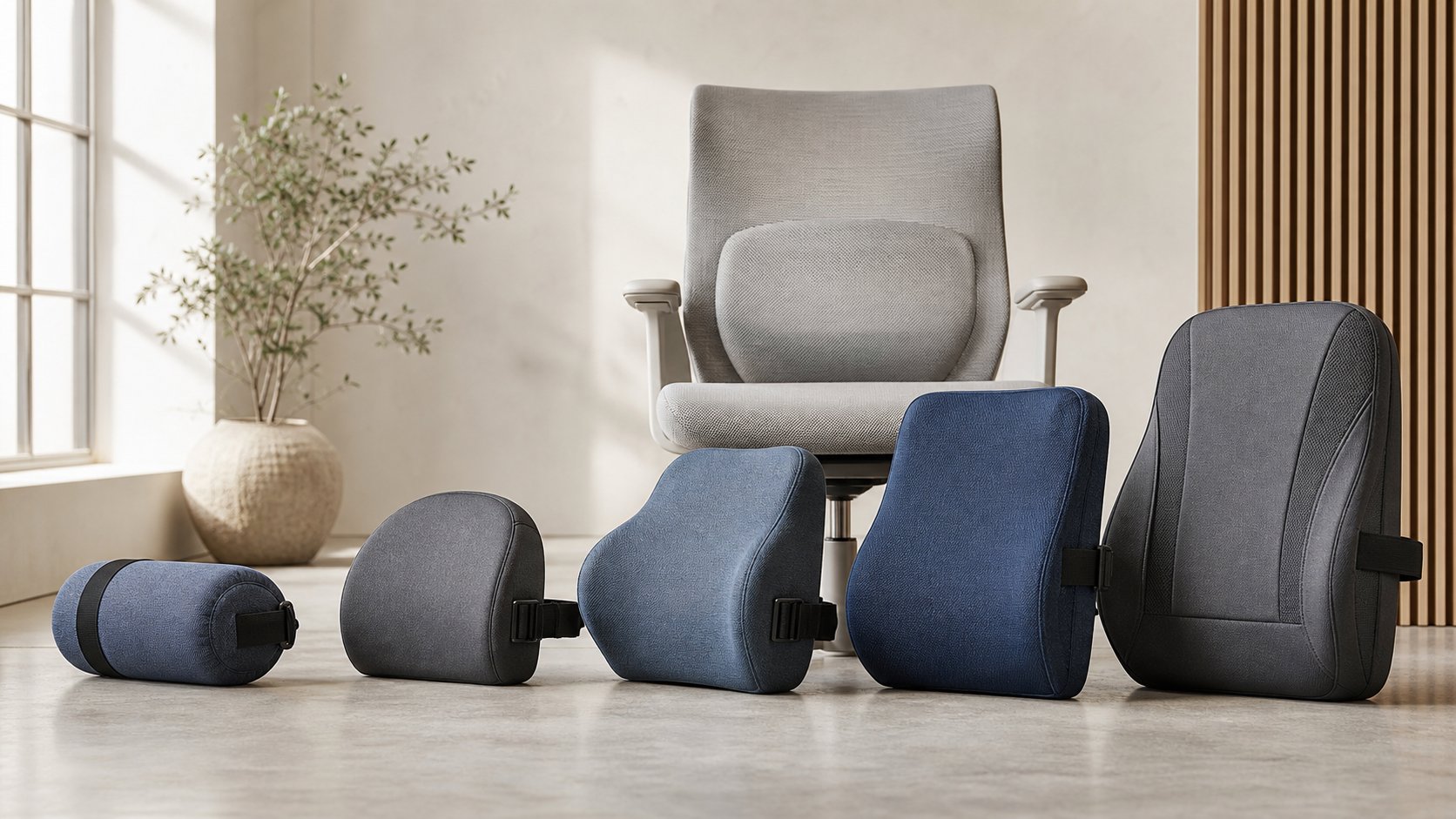
The Original McKenzie Lumbar Roll is the best low-profile starting point for a chair that needs a small, firm curve. The Fellowes Lumbar Back Support is a practical budget shape, TEMPUR LumbarCushion adds broader mid- and lower-back contact, Cushion Lab’s Back Relief Pillow suits users who want a tall contoured cushion, and ObusForme Lowback replaces more of the chair’s back surface.
A cushion is useful only when the chair has enough seat depth left after installation. If it pushes the pelvis forward, removes thigh support or prevents upper-back contact, choose a thinner support or adjust the chair instead.
RemoteNest has not performed clinical or pressure-mapping tests. This shortlist compares current product shapes and documented features, not treatment outcomes.
Quick comparison
| Option | Profile | Best use | Main trade-off |
|---|---|---|---|
| Original McKenzie Lumbar Roll | Small cylindrical roll | Precise low-back curve | Firm, focused contact |
| Fellowes Lumbar Back Support | Low-profile contoured foam | Simple budget support | Limited positioning range |
| TEMPUR LumbarCushion | Broad 15 × 15 × 4 in cushion | Wider mid/lower-back contact | Uses substantial seat depth |
| Cushion Lab Back Relief Pillow | Tall multi-region contour | Full, shaped contact | Can overwhelm small chairs |
| ObusForme Lowback | Structured full backrest | Flat or unsupportive chair backs | Changes the entire chair geometry |
1. Original McKenzie Lumbar Roll: best low-profile starting point
The Original McKenzie Lumbar Roll measures 4¾ inches in diameter and 11 inches long, with standard and firm foam options and an adjustable strap.
Best for: adding a narrow curve without replacing the chair’s full backrest.
Strengths: small footprint, two firmness choices, washable cover and easy height adjustment.
Trade-offs: the round profile creates concentrated pressure if set too high or if the chair already has strong lumbar contour. Start lower and reduce pressure rather than forcing the spine forward.
2. Fellowes Lumbar Back Support: best simple budget cushion
The Fellowes Lumbar Back Support uses a low-profile high-density foam shape with an adjustable strap.
Best for: a conventional office chair with a mildly flat back.
Strengths: straightforward design, compact profile and broad availability.
Trade-offs: one strap can slide on tapered or mesh backs. The fixed contour may not align with every user or recline position.
3. TEMPUR LumbarCushion: best broad foam support
The TEMPUR LumbarCushion is listed at 15 × 15 × 4 inches and is designed to contact the mid and lower back.
Best for: a broad chair back and users who prefer slower-response foam over a firm roll.
Strengths: wide contact area and simple one-piece shape.
Trade-offs: four inches of nominal depth can materially shorten a seat. Temperature and time change how viscoelastic foam feels, so a brief showroom press is not a complete trial.
4. Cushion Lab Back Relief Pillow: best tall contour
Cushion Lab’s Back Relief Lumbar Pillow uses a tall multi-region foam profile and an adjustable chair strap.
Best for: users who want contact beyond a small lumbar roll and have a chair large enough to accommodate it.
Strengths: shaped coverage, washable outer materials and multiple color choices.
Trade-offs: the tall contour can fight a chair’s existing lumbar system or shoulder support. Verify current dimensions on the selected variant before ordering.
5. ObusForme Lowback: best structured full-back insert
The ObusForme Lowback Backrest Support combines a rigid S-shaped frame, foam, cover and removable lumbar pad.
Best for: a flat dining chair or other seat that lacks a useful backrest.
Strengths: replaces a larger area than a pillow and keeps its own structured shape.
Trade-offs: the unit changes seat depth, back height and recline behavior. It is not a substitute for a stable, adjustable task chair when long daily use justifies one.
Adjust the chair before adding a cushion
OSHA’s chair guidance recommends a backrest that follows the spine’s natural curve, a seat depth that supports the thighs without pressing behind the knees and feet supported by the floor or a footrest.
Before buying:
- Sit fully back in the chair.
- Adjust seat depth if available.
- Set backrest height or lumbar position.
- Reduce excessive built-in lumbar pressure.
- Set recline tension.
- Adjust seat height for the keyboard.
- Add a footrest if the feet lose support.
A cushion cannot fix a seat pan that is too long, a desk that is too high or a backrest that forces the shoulders forward.
Measure lost seat depth
Place a folded towel where the cushion would sit and measure the new usable distance from the support to the front edge.
The result should allow:
- Most of the thighs to remain supported
- Clearance behind the knees
- The pelvis to reach the back support
- Feet to stay supported
- The user to recline without sliding
A thick pillow can turn a correctly sized chair into a shallow one. Petite users sometimes benefit from reduced effective depth; taller users may lose necessary support.
Pick profile before material
Cylindrical roll
Creates a narrow, adjustable curve. Easy to move vertically and useful for testing different heights.
D-shaped roll
The flat back rests against the chair while the curved face supports the user. It usually moves less than a cylinder.
Contoured pillow
Spreads contact over a wider area. Thickness and wing shape determine how much it changes the seat.
Full-back insert
Replaces much of the chair surface. Useful on simple chairs but most likely to alter armrest, headrest and recline relationships.
Choose the smallest profile that creates comfortable, stable contact.
Firmness is not support quality
Very soft foam may compress until it provides little elevation. Very firm foam may create a focal pressure point. Memory foam response changes with room temperature, body warmth and time.
Evaluate loaded thickness after 30 minutes, not only the product’s uncompressed dimension. A support should fill a gap without making the user brace against it.
Position the cushion correctly
“Lumbar” does not mean centered in the middle of the back. Start with the thickest point near the inward curve of the lower back, then move it in small increments.
Signs it may be too high or thick include:
- Ribs or mid-back feel pushed forward
- Pelvis slides toward the seat edge
- Upper back loses contact
- Shoulders round to reach the keyboard
- The cushion must be constantly removed
Signs it may be too low include pressure at the belt line without useful back contact.
Individual anatomy and conditions vary. Seek qualified clinical advice for persistent pain, numbness, weakness, symptoms after injury or pain that worsens during the trial.
Test straps and chair shape
A single horizontal strap works best on a backrest with parallel sides. It may slip on:
- Narrow-top gaming chairs
- Open mesh frames
- Backrests with hard plastic ribs
- Very wide lounge chairs
- Separate moving lumbar panels
Do not route straps through chair mechanisms or around controls. Check that buckles do not press into the backrest material.
Run a five-day trial
Download the lumbar cushion fit test and record one change at a time.
Day 1: baseline
Work without the cushion and record seat depth, back contact and discomfort timing.
Day 2: low support
Install the cushion at modest height and pressure. Keep other settings unchanged.
Day 3: position
Move it no more than an inch and compare.
Day 4: normal movement
Recline, type, join calls and leave the chair normally. Note sliding and heat.
Day 5: full-session decision
Keep it only if support remains comfortable and no new pressure or reaching appears.
Cleaning and replacement
Check whether the cover is removable, machine washable or spot-clean only. Foam cores generally should not be machine washed unless the manufacturer says otherwise.
Replace a cushion when it:
- No longer recovers its shape
- Slides despite correct strap adjustment
- Develops permanent folds
- Has damaged foam or fasteners
- Cannot be cleaned adequately
Do not add multiple cushions to compensate for each other. Reassess the chair.
Common mistakes
Buying the thickest option. More projection can reduce useful seat depth.
Placing it at the waist by label alone. Adjust to actual back contact.
Using it over strong built-in lumbar support. Competing curves create pressure.
Ignoring upper-back contact. The whole backrest relationship matters.
Expecting a cure. Cushions are fit accessories, not medical treatment.
Sitting still because support feels better. Position changes remain important.
Final recommendation
Start with the Original McKenzie roll when the chair needs a small, adjustable curve. Choose Fellowes for a simple low-profile cushion, TEMPUR for broad foam contact, Cushion Lab for a tall contour or ObusForme when a basic chair needs a structured back surface.
Adjust the chair first, measure remaining seat depth and test for five ordinary workdays. The best lumbar cushion supports light, stable contact without pushing the body away from the desk or replacing healthy movement.