Standing Desk vs Sitting Desk: Which Is Better for Remote Work?
Compare standing and sitting desks for comfort, movement, focus and cost. Learn why alternating positions usually matters more than choosing one posture all day.
What to know first
- Start with the work you do, not the look you want.
- Protect clearances before choosing furniture.
- Spend first on items you touch for hours each day.
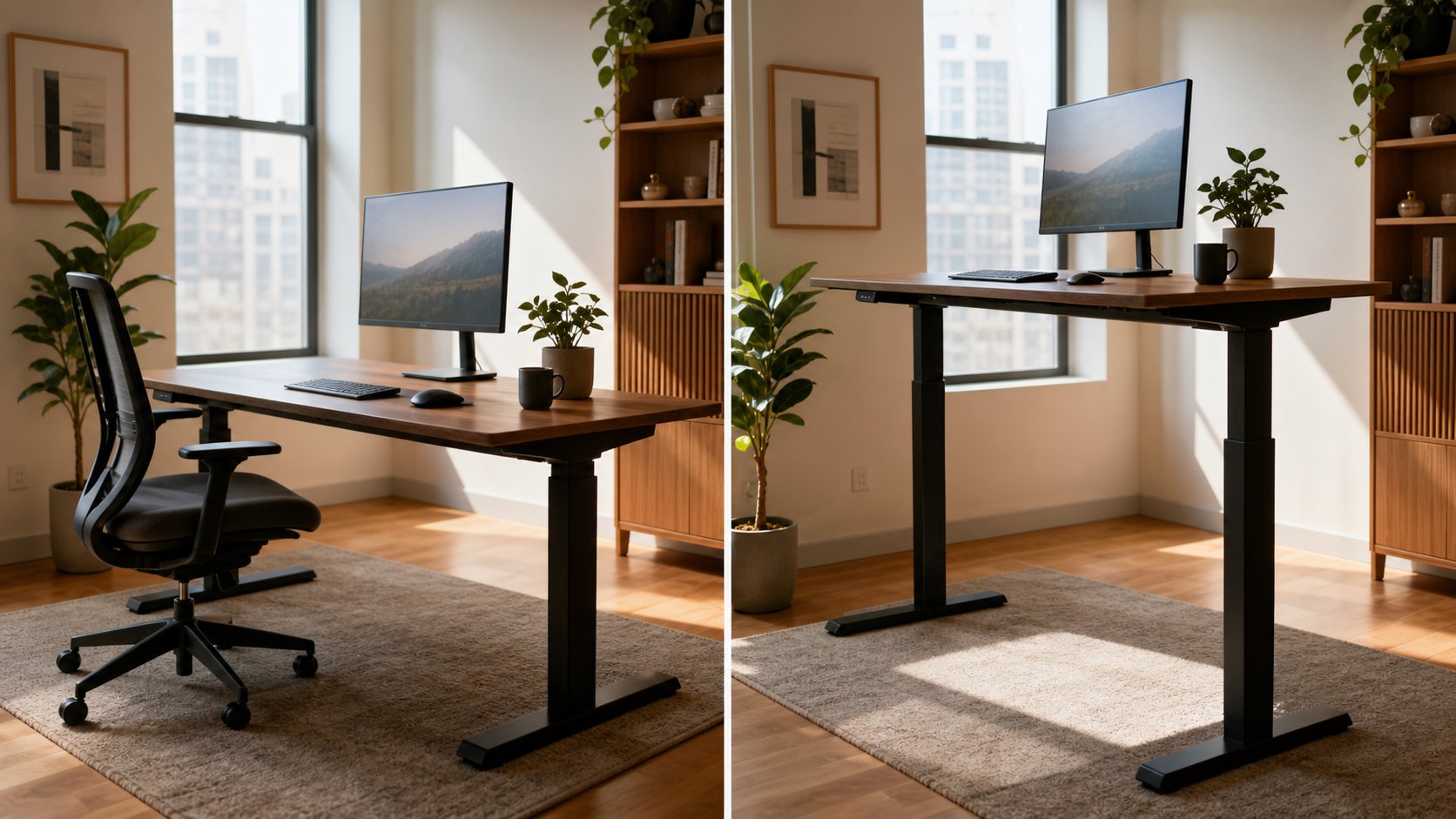
The better choice between a standing desk and a sitting desk is usually neither position by itself. A stable sitting setup supports demanding work economically. A sit-stand desk makes position changes easier. Standing all day introduces its own fatigue, while sitting all day concentrates another set of demands.
Choose a fixed desk when it fits your body and budget. Choose an adjustable desk when you will actually alternate positions and the mechanism provides the range, depth and stability your work requires.
Quick comparison
| Question | Fixed sitting desk | Sit-stand desk |
|---|---|---|
| Purchase cost | Lower | Higher |
| Mechanical complexity | Minimal | Motor or crank system |
| Position options | Seated, plus breaks away | Seated and standing at the workstation |
| Stability | Often strong for the price | Varies, especially when raised |
| Cable planning | Simple | Must work through full travel |
| Best for | Tight budgets, stable seated work | Frequent position changes |
| Main risk | Prolonged uninterrupted sitting | Prolonged standing or poor raised fit |
A desk does not create movement automatically. It only makes one form of change more available.
What the evidence supports
Sit-stand workstations reliably change behavior more than they prove long-term health outcomes. A NIOSH-indexed scoping review of 53 studies concluded that these desks effectively change sitting and standing behavior, while measured health effects were generally mild and evidence was strongest for discomfort rather than productivity.
Earlier Cochrane work found low- to very-low-certainty evidence that sit-stand desks can reduce workplace sitting in the short term, but long-term health effects remained uncertain.
That distinction matters. Replacing some sitting with standing is not the same as adding meaningful physical activity.
NIOSH also warns that prolonged standing is associated with low-back pain, fatigue, muscle pain, leg swelling and discomfort. Its prolonged-standing review identifies dynamic movement as the most useful general response.
The evidence-aware takeaway is simple: alternate and move. Do not treat standing as a cure.
Benefits of a fixed sitting desk
Better value
A simple fixed desk can provide a deep, stable surface without motors, controls or moving cables. More budget remains for a chair, monitor, keyboard and reliable technology.
Stable for precision work
Heavy monitors, drawing tablets, microphones and monitor arms expose wobble. A solid fixed frame often outperforms an inexpensive adjustable frame at the same price.
Fewer failure points
There is no motor, control box or lifting column to repair. A well-built table can remain useful for decades.
Easy cable management
Cables do not need enough slack for vertical travel. Wall-mounted power and data routes are easier to manage.
Limitations of a fixed sitting desk
A standard desk is often around a conventional height rather than your ideal keyboard height. Shorter users may need a higher chair and footrest; taller users may need a keyboard tray or different surface.
Changing position requires leaving the desk. That is not necessarily bad—a short walk offers more movement than simply standing in place—but it can be less convenient during calls or long documents.
Benefits of a sit-stand desk
Lower friction for position changes
The main advantage is not standing. It is the ability to change working height without leaving the task.
Better fit across users
A wide adjustment range can accommodate different seated and standing elbow heights. This is useful for shared desks.
Flexible task positioning
Some people prefer standing for short calls, reviews or administrative work and sitting for detailed creation.
Easier response to temporary discomfort
A position change can redistribute demand. It should not be treated as medical treatment, but variation can be useful.
Limitations of a sit-stand desk
Cost
A reliable frame, useful height range, stable surface and long warranty cost more than basic fixed furniture.
Raised wobble
Every adjustable desk becomes less rigid as the columns extend. Monitor size, desktop depth, floor condition and typing force affect visible movement.
Cable complexity
Power, display and network cables must reach both positions without pulling, pinching or entering moving parts.
False health expectations
Standing in one place for hours is still static. The desk does not replace walking, exercise, sleep or medical care.
Mechanical maintenance
Motors, controllers and lifting columns can fail. Replacement parts and support matter.
Who should choose a fixed desk?
Choose a fixed sitting desk when:
- Budget is limited.
- Current desk height can be fitted with chair and foot support.
- Heavy equipment needs maximum stability.
- Standing work is not appealing.
- Movement breaks already occur reliably.
- Long-term mechanical simplicity matters.
A fixed desk is not inherently less ergonomic. It can be an excellent workstation when input devices, screen and seating fit.
Use the free ergonomic desk changes before replacing it.
Who should choose a sit-stand desk?
Choose a sit-stand desk when:
- You genuinely prefer alternating positions.
- A fixed desk cannot reach a comfortable seated height.
- Multiple people share the surface.
- Calls or reviews work well while standing.
- Budget covers a stable frame and correct depth.
- Cables and monitor equipment can move safely.
Do not buy one only because standing is marketed as healthy. Test standing work at a safe temporary counter for short periods first.
How long should you stand?
There is no universal sit-to-stand ratio that fits every person, task and health condition.
Start with five to fifteen minutes of standing during a low-risk task, then sit before fatigue becomes pronounced. Repeat if comfortable. Build gradually rather than attempting half a day immediately.
Signs to change position include:
- Shifting weight constantly
- Locking the knees
- Leaning on the desk
- Foot or leg discomfort
- Reduced concentration
- Raised shoulders
- Reaching down to the keyboard
Standing duration is not a performance score. Some people should limit or modify standing based on health, pregnancy, balance, circulation or clinical advice.
Set the desk correctly in both positions
Sitting
- Support feet on floor or stable footrest.
- Set chair height from keyboard level.
- Keep keyboard and mouse close.
- Use the backrest.
- Center the main screen.
- Leave clear knee space.
Standing
- Wear stable, comfortable footwear as appropriate.
- Keep knees relaxed rather than locked.
- Set the keyboard near standing elbow height.
- Keep wrists broadly aligned with forearms.
- Center and raise the screen independently.
- Avoid leaning on one arm for long periods.
Use the standing-desk height calculator for an initial range, then adjust from actual elbow and eye position.
Standing mat: useful but optional
An anti-fatigue mat can make a hard floor more comfortable. It does not make unlimited standing safe.
Choose a mat with:
- Stable, beveled edges
- Enough area for small foot changes
- A surface that suits footwear
- Placement outside chair-caster paths when seated
A folded blanket or unstable foam is a trip hazard. If the floor is already resilient and standing periods are brief, a mat may add little.
Converter vs full adjustable desk
A standing-desk converter sits on a fixed desk and raises equipment.
Advantages: lower commitment, no furniture replacement and quick installation.
Limitations: reduces usable depth, raises seated keyboard height, adds visual bulk and may wobble.
A full sit-stand desk usually offers a cleaner range and more surface but costs more and requires assembly.
Measure seated keyboard height before buying a converter. Many fail because their lowest position is already too high.
What to compare before buying
Height range
Confirm both the lowest seated setting and highest standing setting. Marketing photos do not prove fit.
Desktop depth
Large monitors need viewing distance. Aim for enough depth after any keyboard tray, monitor base or converter is installed.
Stability
Look for independent testing where possible. Evaluate front-to-back and side-to-side movement at your standing height.
Load rating
Include desktop, monitors, arms, computer, speakers and accessories. Operate below the maximum rather than exactly at it.
Speed and noise
Important in shared rooms and frequent transitions, but secondary to stability and range.
Controls
Memory presets reduce friction. Collision detection is useful but does not replace keeping the travel path clear.
Warranty and parts
Check coverage for frame, motor, electronics and desktop separately. Verify support in your country.
Cable setup for moving desks
- Mount the power strip to the moving frame when permitted.
- Run one protected power cable toward the wall.
- Leave a controlled service loop through full travel.
- Keep cables outside lifting columns and crossbars.
- Test the highest and lowest positions slowly.
- Keep wall plugs accessible.
Do not attach a cable so tightly that desk movement pulls on the device port.
Common mistakes
Standing all morning on day one. Adapt gradually.
Buying by maximum height only. The minimum seated height may be more important.
Ignoring monitor movement. A fixed wall monitor will not follow the desk.
Using standing to work through pain. Persistent symptoms need qualified assessment.
Raising only the laptop. Add external input devices for longer work.
Skipping ordinary movement. A walk changes more than a button press.
Final recommendation
Keep a fixed sitting desk when it is stable, deep enough and can be fitted to you. Buy a sit-stand desk when easy position changes solve a real behavior or fit problem and the model offers adequate range, stability and support.
Neither sitting nor standing should fill the entire day. The better workstation makes comfortable variation easy and leaves room to move away from the desk entirely.